Paga con Klarna

Garanzia di 2 anni

Tutte le serie

  • Energy Label Europe G
    Ottimizzato per il gioco su console di nuova generazione
  • Turntable image 1Turntable image 2Turntable image 3Turntable image 4Turntable image 5Turntable image 6Turntable image 7Turntable image 8Turntable image 9Turntable image 10Turntable image 11Turntable image 12Turntable image 13Turntable image 14Turntable image 15Turntable image 16Turntable image 17Turntable image 18Turntable image 19Turntable image 20Turntable image 21Turntable image 22Turntable image 23Turntable image 24
  • Ottimizzato per il gioco su console di nuova generazione
  • Ottimizzato per il gioco su console di nuova generazione
  • Ottimizzato per il gioco su console di nuova generazione
  • Ottimizzato per il gioco su console di nuova generazione
  • Ottimizzato per il gioco su console di nuova generazione
  • Ottimizzato per il gioco su console di nuova generazione
  • Ottimizzato per il gioco su console di nuova generazione
  • Ottimizzato per il gioco su console di nuova generazione
  • Energy Label Europe G
    Ottimizzato per il gioco su console di nuova generazione
  • Turntable image 1Turntable image 2Turntable image 3Turntable image 4Turntable image 5Turntable image 6Turntable image 7Turntable image 8Turntable image 9Turntable image 10Turntable image 11Turntable image 12Turntable image 13Turntable image 14Turntable image 15Turntable image 16Turntable image 17Turntable image 18Turntable image 19Turntable image 20Turntable image 21Turntable image 22Turntable image 23Turntable image 24
  • Ottimizzato per il gioco su console di nuova generazione
  • Ottimizzato per il gioco su console di nuova generazione
  • Ottimizzato per il gioco su console di nuova generazione
  • Ottimizzato per il gioco su console di nuova generazione
  • Ottimizzato per il gioco su console di nuova generazione
  • Ottimizzato per il gioco su console di nuova generazione
  • Ottimizzato per il gioco su console di nuova generazione
  • Ottimizzato per il gioco su console di nuova generazione

Evnia Gaming MonitorDisplay 4K HDR con Ambiglow

Ottimizzato per il gioco su console di nuova generazione
Per i veri appassionati di videogiochi su console, il display progettato per Xbox rivoluziona l'esperienza di gioco. La tecnologia UltraClear 4K UHD con DisplayHDR 400 regala immagini estremamente nitide e vivaci che ti trasportano al centro dell'azione.
Vedi tutti i vantaggi

Ottimizzato per il gioco su console di nuova generazione

  • Progettato per Xbox

  • Evnia 7000

  • 32 (31,5"/80 cm diag.)

  • 3840 x 2160 (4K UHD)

Progettato per Xbox per un'esperienza di gioco ottimale

Progettato per Xbox per un'esperienza di gioco ottimale

Dai il massimo nel gioco su console. Abbiamo collaborato con il team di Xbox per sviluppare questo display progettato appositamente per Xbox e testato per offrire prestazioni visive ottimali con Xbox Series X non appena viene eseguito il collegamento.

Frequenza di aggiornamento di 144Hz per immagini incredibilmente fluide e nitide

Frequenza di aggiornamento di 144Hz per immagini incredibilmente fluide e nitide

Vuoi un gioco intenso, competitivo. Vuoi un display che ti offra immagini nitide e senza ritardi. Questo display Philips riproduce l'immagine fino a 144 volte al secondo, ossia con una velocità 2,4 volte superiore rispetto a quella di un display standard. Una frequenza fotogrammi più bassa permette ai nemici di saltare da un punto all'altro dello schermo, rendendoli bersagli difficili da colpire. Con una frequenza fotogrammi da 144Hz, potrai godere delle immagini più importanti sullo schermo che mostrano il movimento naturale del nemico, garantendoti una mira infallibile. Grazie a un input lag ultra basso e all'assenza dell'effetto schermo strappato, questo display Philips è il tuo partner di gioco perfetto
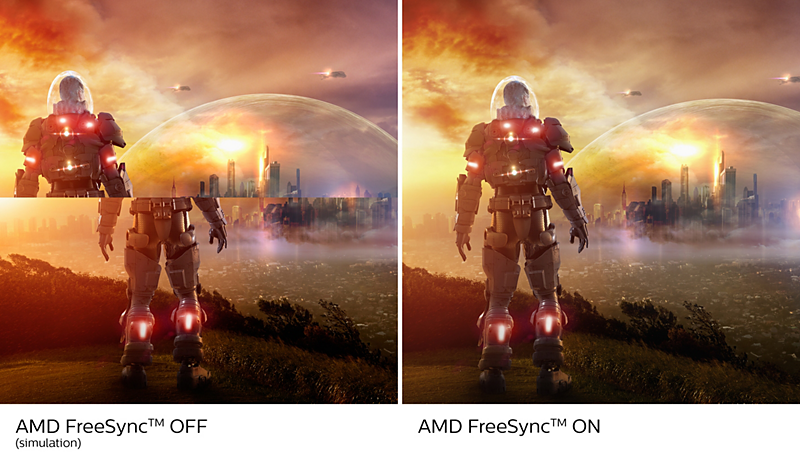
AMD FreeSync™ Premium; gioco fluido, senza distorsioni e scatti

AMD FreeSync™ Premium; gioco fluido, senza distorsioni e scatti

Il gioco non dovrebbe essere una scelta tra grafica incostante o fotogrammi interrotti. La tecnologia AMD FreeSync™ Premium offre ai giocatori più esigenti un'esperienza di gioco fluida e senza distorsioni al massimo delle prestazioni. Non ci sono compromessi: gioca in tutta sicurezza con un'elevata frequenza di aggiornamento, compensazione di frame rate bassi e a bassa latenza.

Specifiche tecniche

Riconoscimenti

  • Award image AWARD-1679621

Recensioni

Considera le recensioni dei prodotti

3.1

su 5


9

Recensioni


5
4
3
2
1

16/04/2022

Italia

Compratore verificato

4k 144kz nessun pensiero

Il monitor ha una qualita costruttiva molto robusta su lato estetico non e' il solito plasticone, i 4k si avvertono con una qualita di immagine buonissima non ho trovato difetti nella matrice LCD e il refresh a massima risoluzione fa sembrare tutto fluido qualunque animazione o gioco. La configurazione del pc dov'é istallato questo monitor e' ryzen9 3900 , rx6900xt e 16gb 3600mhz

Pro

Hai tutto

Contro

gestione led non controllabile da software terzi

Sì, consiglio questo prodotto

Questa revisione è stata effettuata per Gaming Monitor 329M1RV Display 4K HDR con Ambiglow

Sì, consiglio questo prodotto

Questa revisione è stata effettuata per Gaming Monitor 329M1RV Display 4K HDR con Ambiglow

thesnable

26/03/2023

Deutschland

Compratore verificato

Top Monitor

Tatsächlich wirklich super 27 Zoll - perfekte Grösse Ambiview ist mega HDR ist Top Kurz: Klasse

Sì, consiglio questo prodotto

Questa revisione è stata effettuata per Gaming Monitor 279M1RV 4K-HDR-Display mit Ambiglow

Sì, consiglio questo prodotto

Questa revisione è stata effettuata per Gaming Monitor 279M1RV 4K-HDR-Display mit Ambiglow

DoccyProc

05/11/2023

United Kingdom

Great all rounder

I have used this monitor at home for the last year, both for work and occasional gaming use with an Xbox Series X. The general build quality seems excellent, and the stand, while not the most eye catching, is pretty solid. For work, I connect a 2019 MacBook Pro 16" to the monitor via USB C. This gives me a max 4K60 resolution and allows for use of all the USB ports in the monitor's hub (into which I currently have a MIDI keyboard, charging cable for a phone and USB software licenser). No complaints here: as this isn't a thunderbolt monitor I wasn't really expecting it to produce 4K @144 Hz over the USB C connection, AND allow for all those USB ports to function, but the display runs very smoothly over this connection type, albeit at 60Hz. That being said, I'd avoid using the HDR setting for day to day computer use. Mac OS just appears weirdly desaturated and not pleasant to use. For gaming, the monitor is pretty excellent! I set the response time to 'Faster' or 'Fastest' when playing FPS games like Call of Duty, and I feel like using this monitor has genuinely made me better at these games for the response time alone. Having occasionaly played video games on TVs since, I found I was surprised at how big the difference felt to the old Samsung TV I used to use my Xbox on. It's worth mentioning here that colour accuracy is awesome, and being able to adjust the gamma and brightness settings for late night viewing is really helpful. Even viewing at low brightness settings, the monitor is still awesome to look at. The monitor runs really well with the console outputting at 120 Hz and the AMD FreeSync function is super easy to set up with the Xbox Series X console. I've only tried running one game in HDR so far in the last year - Assassins Creed Origins - but I'll be honest, the game displays really weirdly when the console is set to output HDR video. Perhaps this is down to my bad calibration, for I have viewed some 4K HDR content on YouTube, setting the monitor to HDR600, and it did look pretty stunning. But suffice to say I play most of my games in SDR and they still look great on this screen. The speakers are, well, fine. I don't really expect them to blow my socks off as they're device speakers, but fine enough for casual YouTube video watching or whatever. I make use of the monitor's headphone out port with an aux lead, meaning instead of plugging headphones into my controller for gaming, which drains the batttery life out of it, I plug directly into the monitor via my aux extension lead which is very useful. Now, the Ambiglow feature is an interesting one. I thought it'd be really cool to have the edges of the screen basically 'extend' my gaming experience with the 'follow video' function, but in reality there's a noticeable lag with the backlights updating to follow what's happening on screen, so I don't really use that feature. Its the sort of thing that I imagine they'll make happen faster on future monitors, but I'm surprised its a selling point of this one, as it's not entirely useful. However, I do use Ambiglow on 'Static Mode' with the lights set to Orange to create a nice warm glow on the wall behind the monitor on evenings. The other Ambiglow settings (e.g.Color Wave, Color Breathing) are a little gimmicky for use as they're, beyond anything, just distracting to use while doing anything else with the monitor. What surprised me is how basic the choice of colour options are: 'Orange', 'Blue', 'Aquamarine', 'White' (this one's horrible to look at), and so on. Like I said, orange works for me as a nice warm colour to have in the evenings that doesn't strain the eyes, but I'm surprised they didn't build in a simple RGB selector which could have boasted as many colours as you like. Probably something they'll implement on a future monitor to be honest! I make regular use of the Smart Image function, which basically gives you a menu of picture profiles to choose from for different use cases. I use the 'SmartUniformity' profile with my laptop for example, as its a perfect combination of brightness, saturation and colour temperature settings for everyday use in a desktop environment. These picture profiles also affect the response time setting, (which for 'SmartUniformity' uses the least power consuming picture response time) though this can be changed independently. The rest of the profiles are largely aimed for gaming use, with 'FPS, 'Racing', 'Gamer 1' and 'Gamer 2' offering other combinations of response time and colour settings for specific purposes. There is also an 'Xbox' profile which seems to provide calibrated settings for daytime use of the console, in terms of brightness, sharpness and response time. As far as I can tell, the monitor does remember if you've made changes to a screen profile when switching between them, which I find useful, HOWEVER, the xbox profile bizarrely always automatically turns on Ambiglow and sets it to Xbox's trademark green colour, and then leaves that setting on even if you switch back to another profile. Why would you want a permanent green colour lighting up your viewing environment? Green?! I'm being harsh. On the whole, this IS a great monitor. The screen itself is of a fantastic quality and colour reproduction seems excellent. Its gaming features are of an incredibly high spec and its other USB features are very useful to my home setup. I've seen other reviews claiming that the monitor does occasionally turn off or misbehave, and very, very occasionally I have seen the screen go off, almost like its restarting itself, but normally doing the old power-off-power-on routine seems to iron out any misbehaviours. Hope this review helps!

Pro

Great Picture Quality, Great Colour Accurary, USB hub is really useful

Contro

Some Ambiglow features are a little gimmicky

Sì, consiglio questo prodotto

Questa revisione è stata effettuata per Gaming Monitor 279M1RV 4K HDR display with Ambiglow

Sì, consiglio questo prodotto

Questa revisione è stata effettuata per Gaming Monitor 279M1RV 4K HDR display with Ambiglow

Iscriviti alla newsletter Philips per ricevere offerte esclusive

  • Offerte esclusive per gli iscritti e accesso anticipato alle vendite.
  • Accesso anticipato alle offerte.
  • Notizie sul lancio di prodotti e consigli per uno stile di vita sano.
  • Consigli degli esperti e idee

Desidero ricevere comunicazioni promozionali sui prodotti, servizi, eventi e promozioni Philips, in base alle mie preferenze e al mio comportamento. Posso annullare l’iscrizione in qualsiasi momento.

  • Offerte esclusive per gli iscritti e accesso anticipato alle vendite.
  • Accesso anticipato alle offerte.
  • Notizie sul lancio di prodotti e consigli per uno stile di vita sano.
  • Consigli degli esperti e idee
Esclusioni di responsabilità
  1. La parola "IPS", il marchio e i brevetti delle tecnologie appartengono ai legittimi proprietari.

  2. La risoluzione massima funziona sia con ingresso HDMI che DP.

  3. Per ottenere prestazioni di output ottimali, assicurati che la scheda grafica sia in grado di raggiungere la risoluzione massima e la velocità di aggiornamento del display Philips.

  4. Valore del tempo di risposta pari a SmartResponse

  5. La modalità MPRT regola la luminosità per ridurre la sfocatura, quindi non è possibile regolare la luminosità quando MPRT è attivata. Per ridurre la sfocatura delle immagini in movimento, la retroilluminazione a LED si attiverà in perfetta sincronia con l'aggiornamento dello schermo, che può causare notevoli variazioni della luminosità.

  6. MPRT è la modalità ottimizzata per il gioco. L'attivazione di MPRT può causare un notevole sfarfallio dello schermo. Si consiglia la disattivazione quando non si utilizza la funzione di gioco.

  7. NTSC in base all'area su CIE1976

  8. sRGB: in base all'area su CIE1931

  9. Copertura Adobe RGB secondo gli standard CIE1976

  10. 2020 Advanced Micro Devices, Inc. Tutti i diritti riservati. AMD, il logo AMD Arrow, AMD FreeSync™ e le combinazioni derivanti sono marchi commerciali di Advanced Micro Devices, Inc. Gli altri nomi dei prodotti utilizzati nella presente pubblicazione sono forniti solo per scopi identificativi e potrebbero essere marchi commerciali delle rispettive aziende.

  11. Il monitor potrebbe avere un aspetto diverso rispetto alle immagini esemplificative.